How to Choose an Enterprise AI Inference Workstation
An enterprise AI inference workstation is a desk-side or tower-class computer built to run trained AI models locally for an individual or a small team. To choose one, define the workload first, calculate the memory your models need, confirm precision and software support, then compare security, support, and total cost of ownership, and benchmark your own models before you buy.
A workstation is a practical option for businesses that need local AI inference without the infrastructure, space, and operational overhead of a full data center deployment. For many organizations, it fills the gap between public AI APIs and enterprise AI servers. A new class of compact on-premises AI systems, such as GabeHERO TX, goes further: 128GB of unified memory on NVIDIA Jetson Thor in a desktop footprint, so your data, models, and AI agents stay inside your building.
Not every AI workload belongs on a workstation, though. Model size, memory requirements, concurrent users, latency targets, security needs, and expected growth all affect the right hardware choice.
This guide explains how to choose an AI workstation for business use, how to evaluate AI inference hardware, and how to decide whether a workstation, a compact on-premises AI system, a rack server, or an edge device is the best fit for your enterprise AI infrastructure.
When Is an Enterprise AI Inference Workstation the Right Choice?
A workstation fits best when the AI workload is well defined and serves a limited number of users or applications. Common examples include:
- Engineering: Running AI models against internal technical documents, product specifications, and design information.
- Manufacturing: Running computer vision models to support inspection workflows and production analysis.
- Logistics: Answering questions over shipping documents, standard operating procedures, and carrier agreements in a controlled environment.
- Business operations: Providing a private AI assistant for internal knowledge, documentation, and workflows.
AI Inference Workstation vs. Server vs. Edge Device
Before purchasing a local AI inference workstation, compare the main deployment options.
| Option | Best for | Watch out for |
|---|---|---|
| Public AI API | Experimentation and workloads approved for external processing | Data leaves your environment; usage-based pricing |
| AI inference workstation | One or a few users running models that fit in the system's memory | Size memory and concurrency to the workload |
| Compact on-premises AI system (for example, GabeHERO TX) | Teams and sites that need large-memory local inference and AI agents without a server room | Benchmark peak concurrency on your own models |
| AI inference server or cluster | Larger models, higher concurrency, and workloads shared across teams | Higher cost, data center space, and operations effort |
| Edge AI device | Applications that must run beside sensors, cameras, or industrial machines | Confirm the software stack supports your models |
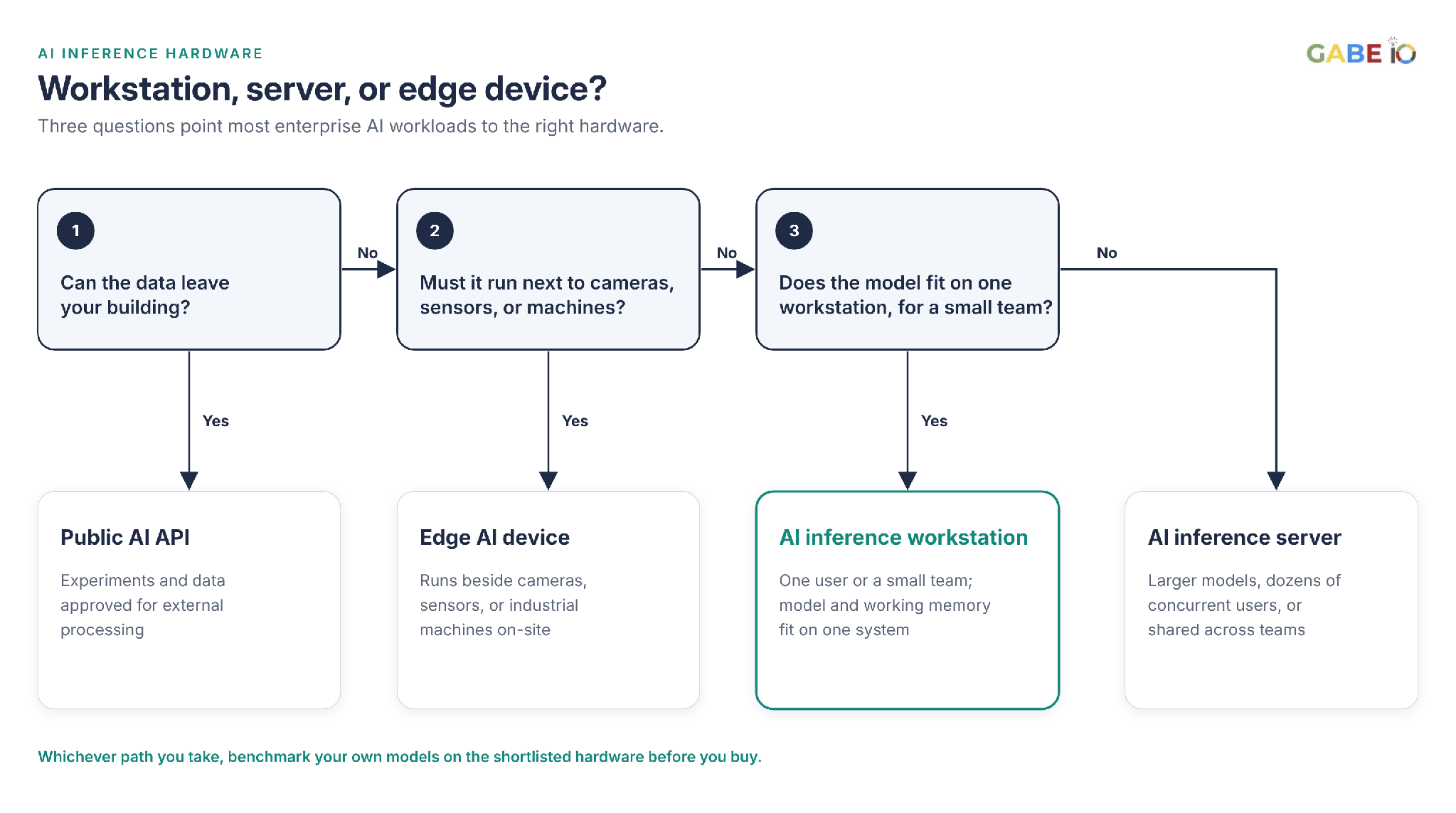
If a model exceeds a single system's practical memory capacity, or an application must serve dozens of concurrent users, an AI inference server is likely more appropriate. Between workstations and servers, a compact on-premises AI system such as GabeHERO TX combines desktop simplicity with 128GB of unified memory and the ability to run beside cameras and machines, which makes it a strong fit for manufacturing and logistics teams. For camera-heavy sites, see how on-site systems handle AI video analytics without cloud.
Step 1: Define Your Enterprise AI Workload
Before comparing AI inference hardware, document the workload the system must support. Clear requirements make it easier to compare products and avoid paying for capacity you do not need.
Evaluate the following factors:
- Models: Identify the exact AI models, their parameter counts, and the precision formats you plan to use.
- Context length: Estimate the amount of text, images, or other information each request processes. Longer contexts require additional memory.
- Concurrency: Determine how many requests may run simultaneously during peak demand.
- Latency: Define how quickly a response must begin and how long the complete response may take.
- Data sensitivity: Identify the information the system will process and the controls required to protect it.
- Growth horizon: Estimate how the number of users, models, and use cases may change over the next two to three years.
An enterprise AI inference workstation should be selected against measurable workload requirements, not vague expectations about future AI use.
Step 2: Calculate AI Model Memory Requirements First
Memory is the most important constraint when selecting a local AI inference workstation. Model weights must fit in available memory, and active requests need additional memory for their working state. A preliminary estimate should account for three components.
Model weights
The memory needed for model weights depends on parameter count and numerical precision:
- 16-bit precision: about 2 bytes per parameter
- 8-bit precision: about 1 byte per parameter
- 4-bit precision: about 0.5 bytes per parameter
The table below applies those rates to common model sizes. These figures cover weight storage only, not the complete memory a running model needs.
| Model size | 16-bit weights | 8-bit weights | 4-bit weights |
|---|---|---|---|
| 7B parameters | ~14 GB | ~7 GB | ~3.5 GB |
| 13B parameters | ~26 GB | ~13 GB | ~6.5 GB |
| 34B parameters | ~68 GB | ~34 GB | ~17 GB |
| 70B parameters | ~140 GB | ~70 GB | ~35 GB |
For example, a 7-billion-parameter model needs about 14 GB for its weights at 16-bit precision, or about 3.5 GB at 4-bit precision, before working memory and system overhead.
Working memory
Each active request needs additional memory. Requirements vary with context length, concurrency, model architecture, and inference software. Estimate memory use at peak demand rather than on average.
Runtime and system overhead
The operating system, inference runtime, retrieval indexes, and other services running on the workstation also consume memory.
Discrete GPU memory vs. unified memory
There are two common memory architectures. Discrete GPU memory provides high bandwidth but is limited by the capacity of each card: the model, its context, and every concurrent request must fit inside it. Unified memory, shared between the CPU and the GPU, gives a single system a much larger pool to work with. Bandwidth differs between the two, so benchmark speed as well as fit.
Why 128GB of unified memory matters
GabeHERO TX is built on the NVIDIA Jetson Thor T5000 with 128GB of unified memory, more than most single workstation GPU cards offer. That headroom leaves room for model weights, longer contexts, retrieval indexes, and concurrent requests on one desktop system, with everything kept on-site. Use the table above to estimate which models fit, then confirm on the system with your own runtime.
Practical recommendation: Measure the memory footprint on candidate systems using your intended models and runtime before making a purchase.
Step 3: Confirm AI Model Precision Support
Quantization reduces the memory needed to store model weights by representing them at lower numerical precision. This can make it possible to run certain models on less expensive or more compact AI inference hardware.
However, lower precision can affect output quality, and compatibility varies by model, accelerator, and software runtime. Before choosing a workstation, confirm that:
- The accelerator supports the precision format required by your model and runtime.
- Your inference software supports the model and its selected quantization format.
- Evaluation results show acceptable output quality for your business tasks.
- The model license permits the version and deployment method you intend to use.
Do not assume that a quantized model performs identically to its full-precision version. Test it against representative tasks and compare quality, latency, throughput, and memory use.
Step 4: Evaluate AI Inference Hardware and Software
The accelerator influences inference throughput, supported model configurations, and available software features. When comparing an enterprise AI inference workstation with other AI hardware, evaluate the complete platform rather than relying on advertised peak performance.
- Runtime compatibility: Confirm that your preferred inference server, model formats, and AI applications work on the platform, and whether deployment needs custom engineering or can use supported configurations.
- Driver and library support: Check the maturity and maintenance of drivers, libraries, and runtime components. Strong software support reduces engineering effort and simplifies production deployment.
- Enterprise software support: Evaluate available software suites, security updates, support agreements, and validated configurations. Include any licensing or subscription costs in the budget.
- Operating system compatibility: Confirm that the workstation supports your organization's operating system, device management, and security requirements.
How to benchmark an AI inference workstation
Benchmark candidate systems using your actual models and representative data. Measure:
- Time to first response
- Total response time
- Throughput under expected concurrency
- Memory utilization
- Output quality
- Sustained performance under continuous load
A high-performance accelerator may not be the best choice if its software stack needs significant custom work. The right AI inference hardware is the platform that meets your workload requirements reliably.
Platform maturity matters as much as raw compute. GabeHERO TX runs on NVIDIA's Jetson platform, with the JetPack software stack, CUDA libraries, and container support, and NVIDIA publishes 2,070 TFLOPS of FP4 (sparse) AI compute for the Jetson Thor T5000 module it is built on. As with any platform, confirm that your models and runtime are supported and benchmark them before you buy.
Step 5: Plan Storage and Data Handling
An AI workstation may store model weights, retrieval indexes, application data, logs, and configuration files. Plan storage before deployment:
- Capacity: Leave room for model versions, retrieval indexes, and logs.
- Speed: Fast local storage reduces model loading times, especially when switching between models.
- Encryption: Use full-disk encryption and manage encryption keys according to organizational policy.
- Backup: Keep documented backups of model artifacts, configurations, and indexes outside the workstation.
- Retention: Define how long logs and processed data are kept.
For private AI for enterprise applications, storage planning should also cover data classification, access permissions, and the movement of information between local and external systems.
Running a model locally does not automatically mean every part of the application stays local. Review external integrations, telemetry, backup services, and other dependencies.
Step 6: Check Power, Cooling, Noise, and Space
An enterprise AI inference workstation may operate in an office, laboratory, or manufacturing environment, so physical requirements matter alongside model performance.
- Power consumption: Confirm the system's power requirements, circuit capacity, and expected electricity use. Decide whether an uninterruptible power supply is needed for graceful shutdown or continuity.
- Cooling and thermal performance: Evaluate sustained performance under continuous load. A system that performs well in a short benchmark but slows down after heating up may not meet production requirements.
- Noise: Review acoustic specifications under realistic operating conditions, especially for a shared office.
- Dimensions and placement: Check the system's size, ventilation clearances, and physical security requirements before installation.
These factors affect operating costs and decide whether a workstation is practical for the intended environment.
Compact desktop systems change this part of the decision. GabeHERO TX is designed to sit in an office, lab, or plant rather than a server room, so installing it is closer to placing a workstation than building out infrastructure.
Step 7: Assess Security for an On-Premises AI System
An on-premises AI system gives an organization more direct control over its infrastructure and data handling. However, local deployment still needs appropriate security controls. For a workstation processing confidential business information, assess:
- Secure boot and firmware update controls
- Restricted administrative access
- Strong authentication and account management
- Encryption for stored data
- Network segmentation and outbound connection policies
- Logging of access and administrative activity
- Security patching and vulnerability management
- Backup and recovery procedures
Integrate the workstation into the organization's standard endpoint management process.
Offline operation adds another layer of control for sensitive workloads. GabeHERO TX keeps running with the network cable unplugged, which we show in our live demo, so confidential data and AI agents can keep working without an external connection.
For private AI for enterprise use, also review how prompts, retrieved documents, model outputs, and application logs are handled. Confirm whether the system requires external services, and make sure any data transfers comply with organizational policy. For a deeper look, see What Is Private AI Inference?
The objective is not simply to run AI on-premises. It is to deploy AI within a security and governance framework the organization can maintain.
Step 8: Plan for Enterprise AI Infrastructure Growth
AI workloads often expand as teams discover new use cases, and a workstation that meets today's requirements may eventually fall short. Consider the expansion path before selecting a platform:
- Multiple systems: Can you add another unit for a new team or site, managed with the same approved configuration, instead of re-platforming? Compact systems make growth incremental.
- Migration to an AI inference server: Can the same software stack run on a server-class platform if model size or concurrency grows?
- Application portability: Use documented configurations and standard interfaces so applications can move between supported hardware without rewrites.
- Capacity planning: Estimate how memory requirements, concurrency, and model usage could change over the system's service life.
Planning for growth keeps the first system from becoming a costly dead end. For organizations building toward full control of their AI stack, see Sovereign AI Infrastructure: Benefits, Architecture, and Deployment.
Step 9: Evaluate Warranty, Lifecycle, and Technical Support
An enterprise AI inference workstation is an operational investment, so support arrangements belong in the selection process. Review:
- Hardware and software support periods
- Warranty coverage and service turnaround times
- Availability of replacement parts
- Firmware and driver update commitments
- Vendor technical support
- Hardware lead times and deployment schedules
Match the support period to the expected service life. If you plan to run the system for three years, confirm that hardware and software support cover that period.
For business-critical applications, plan for what happens if the workstation fails and how quickly service can be restored.
Step 10: Calculate Total Cost of Ownership
The purchase price is only one part of the cost of an AI workstation for business use. Calculate total cost of ownership over the planned service life, including:
- Hardware purchase price
- Electricity and cooling
- Software licenses and support
- Installation and configuration
- Staff time for maintenance, monitoring, and user support
- Warranty extensions and replacement parts
- Backup and recovery arrangements
- End-of-life disposal or resale
Compare these costs against a public AI API at your expected usage and an AI inference server that could support the same workload. For workloads that process sensitive information, also weigh the operational and compliance requirements of each deployment model.
The lowest upfront price does not necessarily produce the lowest long-term cost. The best investment is the system that meets your performance, security, and growth requirements at an acceptable total cost.
How to Choose an AI Workstation: A 7-Step Selection Process
Use this process to shortlist and validate candidate systems.
- Define the workload. Document model size, context length, concurrency, latency, and data sensitivity.
- Shortlist two to four systems. Filter candidates by memory, precision support, physical constraints, and software compatibility.
- Benchmark your models. Measure latency, throughput, memory use, and output quality on representative tasks.
- Test sustained performance. Run each system under continuous load that reflects a realistic working period.
- Review security and support. Confirm that IT and compliance requirements can be met.
- Calculate total cost of ownership. Include hardware, energy, software, staffing, and maintenance.
- Pilot with users. Test the system in a controlled environment before purchasing at scale.
Vendor benchmarks can help narrow the options, but they may not reflect your workload. Testing your own models gives a far more useful basis for the final decision.
Enterprise AI Inference Workstation Readiness Checklist
Before purchasing, confirm that:
- The workload is defined by model, context length, concurrency, latency, and data sensitivity.
- Memory requirements have been estimated and verified on candidate systems.
- Precision support and quantized model quality have been tested.
- The software stack supports the required models and inference runtime.
- Storage, encryption, backup, and retention requirements are documented.
- Power, cooling, noise, and physical placement have been checked.
- Security and device management meet organizational standards.
- A migration path to an AI inference server is documented.
- Warranty, support, and spare parts cover the planned service life.
- Total cost of ownership has been compared with cloud AI and server alternatives.
- Benchmarks have been run using representative models and data.
Frequently Asked Questions About AI Inference Workstations
What is an enterprise AI inference workstation?
An enterprise AI inference workstation is a desk-side or tower-class computer built to run trained AI models locally for an individual or a small team. It lets a business use AI on its own data without sending that data to a public AI service or building out a data center.
What is GabeHERO TX?
GabeHERO TX is an on-premises AI system from Gabe IO, built on NVIDIA Jetson Thor T5000 (2,070 TFLOPS FP4 sparse, NVIDIA's published figure) with 128GB of unified memory. It runs AI models, data, and agents inside your facility and keeps running with the network cable unplugged.
Can an AI inference workstation replace a server?
An AI inference workstation can support bounded workloads with a small number of concurrent users and models that fit within its memory capacity. An AI inference server is generally more suitable for larger models, high concurrency, and workloads shared across multiple teams.
How do I choose an AI workstation for business use?
Start by defining the models, memory requirements, concurrency, latency targets, security needs, and expected growth. Then compare hardware, software compatibility, support, and total cost of ownership. Validate shortlisted systems with your own workloads before purchasing.
How much memory does an enterprise AI inference workstation need?
It depends on the model's parameter count, numerical precision, context length, concurrency, and software overhead. As a starting point, model weights need about 2 bytes per parameter at 16-bit precision and about 0.5 bytes at 4-bit precision, so a 70B model needs roughly 35 GB for its weights alone at 4-bit. Add memory for active requests and overhead, then verify the total footprint on the target system. Systems with large unified memory, such as GabeHERO TX with 128GB, leave more headroom than a typical single GPU card.
Is quantized AI suitable for enterprise inference?
Quantization can reduce memory requirements and make certain models easier to deploy on local hardware. Its suitability depends on the model, supported precision formats, and the quality required for the business task. Test the quantized model on a representative evaluation set before deployment.
Is an on-premises AI system more secure than cloud AI?
Not automatically. On-premises AI can provide more direct control over data handling and infrastructure, but security depends on configuration, access management, patching, monitoring, and operational practices. Compare the actual controls available in each environment against your requirements.
What is the difference between an AI workstation and an AI inference server?
An AI workstation generally serves an individual or small team with a bounded workload. An AI inference server is designed for workloads that need greater capacity, higher concurrency, or shared access across teams. The right choice depends on the model requirements and expected demand.
How much does an enterprise AI inference workstation cost to operate?
Operating costs depend on hardware power consumption, electricity rates, cooling, software, maintenance, and staff time. Estimate these costs over the expected service life and compare them with cloud AI usage and server-based alternatives.
See Whether GabeHERO TX Fits Your Workload
Choosing the right enterprise AI inference workstation starts with your models, your data, and your costs at real usage levels.
Tell us which models you want to run, how many people will use them, and what data they touch. We will show you whether GabeHERO TX fits, how it compares with a server or cloud AI at your usage, and what a pilot would look like.
[Request More Information]