Can You Run AI Agents Entirely On-Premises? What It Takes
Nothing has to leave the building: a practical guide to on-premises, sovereign AI for manufacturing and logistics.
Yes. You can run AI agents entirely on-premises, with the models, the data, and the agents all on your own hardware and no data leaving your facilities. It takes four things: purpose-built hardware, properly sized models, careful access controls, and robust auditability. For manufacturing and logistics operations managing sensitive supply chain or operational data, on-premises AI is achievable and increasingly necessary.
What On-Premises AI Means for Your Business
If your organization processes sensitive operational data (supply chain plans, production schedules, customer information, or proprietary logistics details), on-premises AI agents offer complete control: your data never enters a third-party cloud, no vendor can see your operations, and you maintain full audit trails for compliance.
The tradeoff is straightforward: you assume responsibility for hardware procurement, infrastructure management, and ongoing maintenance. The payoff is data sovereignty, simpler compliance, and predictable costs: fixed on-premises capacity instead of usage-based cloud API bills.
How On-Premises AI Works: Architecture Overview
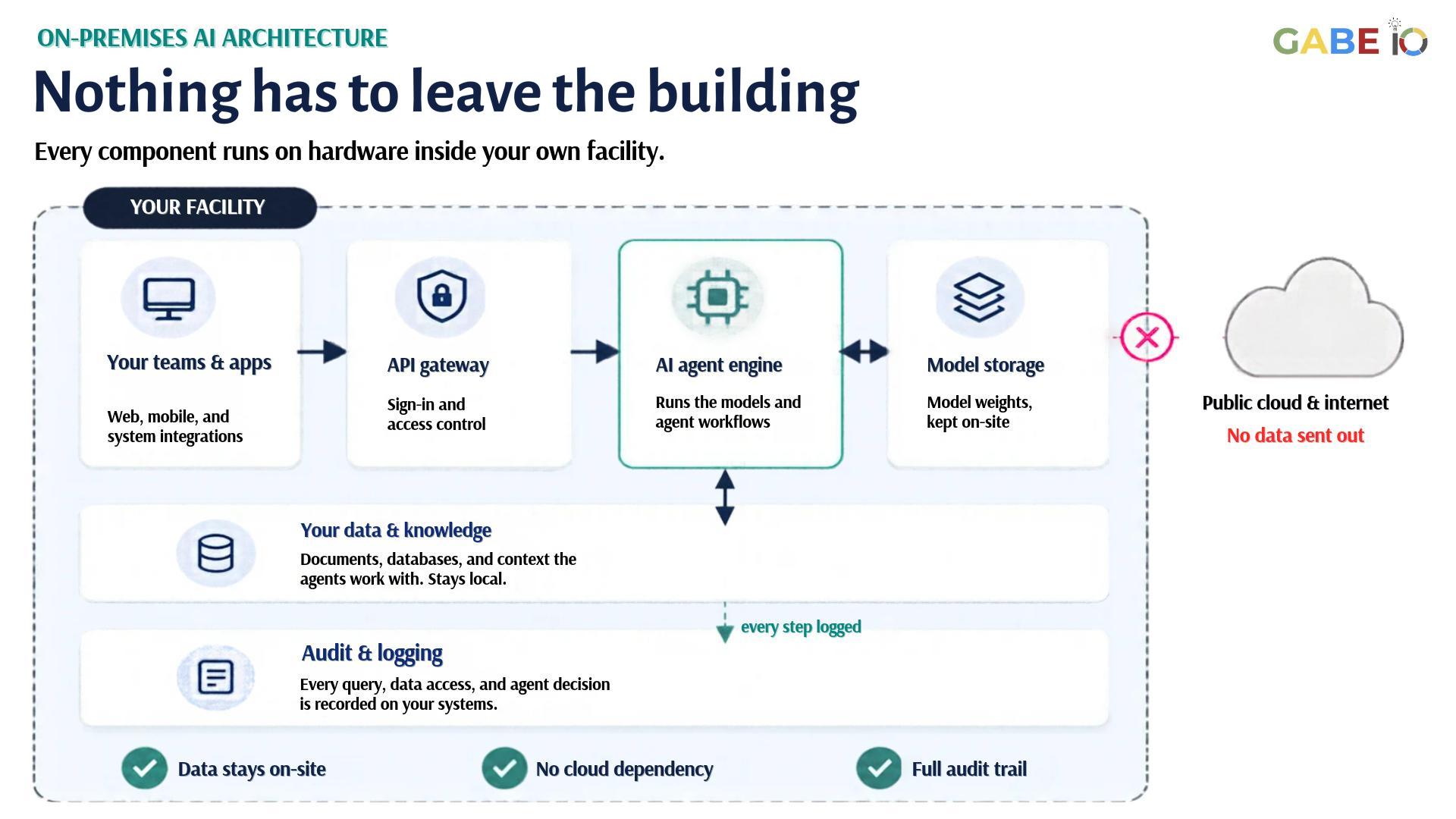
What hardware do you need to run AI agents on-premises?
On-premises AI agent deployment needs the five components below. There are two common ways to provide them: a GPU server in a data center or server room, or a compact edge AI appliance installed on site.
- GPU or AI accelerator: Data-center GPUs (such as NVIDIA L40S or H100) in a server, or an embedded AI module such as NVIDIA Jetson Thor in an edge appliance. Server deployments typically use 1–8 GPUs, depending on throughput and model size.
- CPU resources: A multi-core CPU for coordination, the API gateway, and non-inference tasks: a server CPU (AMD EPYC, Intel Xeon, or equivalent) in a rack, or the integrated Arm CPU in an edge appliance.
- Memory: Enough memory to hold your models and their context. Edge appliances with unified memory (shared by CPU and GPU, for example 128GB) handle many agent workloads; larger models and batch sizes need more GPU memory, which points to a server.
- Storage: High-speed NVMe storage for model weights, logs, and operational data. Plan for at least 2TB for models plus operational headroom.
- Network: Gigabit or higher internal networking. Configured correctly, no outbound connection is needed; updates can be staged offline.
For many manufacturing and logistics sites, a compact edge appliance handles these workloads without a dedicated server room. GabeHERO TX, for example, is built on NVIDIA Jetson Thor T5000 (2,070 TFLOPS FP4 sparse, NVIDIA’s published figure) with 128GB unified memory and 2TB NVMe storage, and runs models, data, and agents entirely inside your facility. Gabe IO can help you size the right option for your inference volume and latency requirements.
Which AI models can run locally, and how do you choose one?
Any open-source or licensed model with published weights can run on your infrastructure:
- Smaller, specialized models (7B–13B parameters): Fast inference, lower resource requirements. Examples: general-purpose open models or domain-specific fine-tuned variants. Well suited to real-time logistics routing, supply chain optimization, or production scheduling.
- Medium models (34B–70B parameters): More reasoning capability, still manageable on enterprise hardware. Good for complex decision-making in supply chain scenarios.
- Large models (100B+ parameters): Require significant investment but deliver the broadest reasoning. Consider only if your use case demands it.
How to choose: Start with your use case. For logistics route optimization or production scheduling, a 7B–13B model is often sufficient and responds quickly. For supply chain anomaly detection or complex negotiation scenarios, a 34B–70B model may be better. You can also quantize models (reduce numeric precision, for example to INT8 or INT4) to cut memory requirements substantially, usually with modest accuracy loss.
How do you update AI models, software, and security patches on-premises?
On-premises updates are your responsibility, but this is simpler than it sounds:
- Model updates: Download new weights from the model’s publisher or a trusted model repository, verify them, and swap the model on your inference server during a planned maintenance window. Running more than one inference replica lets you update without interrupting users.
- Software updates: Use standard Linux/container patch management (apt, yum, or container image rebuilds). Inference software is updated frequently, so plan a regular patch cycle.
- Security patches: Apply OS and library patches on your standard schedule. You decide when patches are applied.
- Disconnect scenario: If your facility has no internet access, pre-stage updates on a secure media device and apply them internally.
Organizations managing manufacturing or supply chain systems often prefer the control this gives them: you decide when to update, and you test in your own staging environment before rolling to production.
How do you control access to on-premises AI and sensitive data?
Access control is your responsibility, and your opportunity to be granular:
- Authentication: Connect your existing identity provider (Active Directory, Okta, LDAP) to the API gateway. Users authenticate with their organizational credentials.
- Authorization: Define role-based access. Example: production planners can ask the agent to optimize schedules; procurement can ask it to find suppliers; executives can request summary insights. Use API keys or OAuth tokens scoped to specific agent functions.
- Data scoping: An agent can be configured to access only the documents, databases, or knowledge relevant to a user’s role. A logistics operator sees only their region’s data; a supply chain manager sees cross-region patterns.
- Audit logging: Log every query and every data access.
Manufacturing and logistics teams benefit from this control: you can ensure sensitive pricing, route, or production data reaches only authorized personnel.
How do you log and audit AI agent actions and decisions?
Complete auditability is one of the strongest advantages of on-premises deployment:
- Query logging: Every request to the AI agent is logged with timestamp, user, input, and output. Store logs in your own database or log aggregation system.
- Data access logging: When the agent retrieves documents, database records, or context, log what was accessed, when, and by which user/agent instance.
- Decision traceability: Capture the agent’s reasoning chain (if the model supports it) so you can explain decisions to regulators or internal review.
- Retention: You control how long logs are kept (typically 90 days to 7 years, depending on your industry and regulations).
For regulated manufacturing and logistics operations (such as food production or pharmaceutical and cold-chain logistics), this auditability is a compliance requirement. On-premises deployment makes it native rather than an add-on.
Can AI agents run without an internet connection?
Yes. Configured correctly, an on-premises AI system needs no outbound connection: turn off telemetry and use a local license server where needed. Set up that way:
- No cloud APIs: Inference, data retrieval, and logging all happen locally.
- Telemetry off: With telemetry disabled and licensing handled locally, nothing is sent to vendors.
- Latency: No round trip to a cloud provider; response time depends only on your local hardware and model.
- Limitations: You cannot fetch real-time external data (stock prices, weather, competitor data) without internet. Plan knowledge cutoffs and refresh cycles internally.
For supply chain operations in remote facilities, disconnected networks, or high-security zones, this is a major advantage. GabeHERO TX, for example, keeps running with the network cable unplugged, which we show in our live demo.
Is Your Organization Ready for On-Premises AI? A Readiness Checklist
- Hardware readiness: Do you have space, power, and cooling for either a GPU server or a compact edge appliance? Can you provision enough memory and high-speed storage for the models you plan to run?
- IT operations capacity: Does your team have Linux/Kubernetes expertise, or can you hire it? Can you manage infrastructure updates and security patches?
- Data organization: Is your data (documents, databases, knowledge) catalogued and accessible? Can you define data access policies by role?
- Use case clarity: Can you articulate 1–3 specific, high-value use cases (scheduling, optimization, anomaly detection)? Do you have success metrics?
- Compliance and audit: Do you need compliance reporting (SOC 2, ISO 27001, customer or industry audits)? Can you log and retain audit trails internally?
- Budget and timeline: Do you have budget and a realistic timeline for procurement, deployment, and a pilot? Is there an executive sponsor for the project?
All six items checked? You’re a strong candidate for on-premises AI agents. Fewer than six? Start with a Sovereign AI Assessment to find out what can already run inside your building.
Frequently Asked Questions About On-Premises AI
Is on-premises AI more secure than cloud AI?
It removes one of the biggest risks: your data never travels to a third-party service. But security doesn’t disappear; it moves to you. You still own device hardening, user access, updates, and what agents are allowed to do. With those controls in place, on-premises AI gives your security team more direct visibility and control than sending data to a cloud service.
Can I run a large language model on my existing servers?
It depends on your existing infrastructure. What matters is GPU memory: a 70B model quantized to 4-bit needs about 40–48GB of it. If your servers have NVIDIA GPUs with that much GPU memory (on one card or across several), yes, and you can add GPUs as needs grow. If you have only CPU servers, you’ll need GPUs, or you can add a compact edge AI appliance alongside your existing servers without changing them.
What’s the total cost of ownership?
It depends on your models, workload, and whether you choose a GPU server or an edge appliance. Budget for hardware, integration, staff time to operate it, and ongoing power and maintenance. Unlike usage-based cloud AI APIs, on-premises capacity is fixed, so costs stay predictable as usage grows. A Sovereign AI Assessment gives you a sizing recommendation for your own use cases.
What happens if my facility loses power?
Treat your AI system like any other critical system and put it on UPS and generator backup. Losing internet connectivity doesn’t stop it: inference and data access run locally, as covered in the offline section above.
How do I ensure the AI doesn’t make harmful decisions?
On-premises gives you control over: model choice (use models trained to avoid harmful outputs), prompt design (embed guardrails into agent instructions), human oversight (require human approval for high-impact decisions), and monitoring (log and review all agent decisions). On-premises, all four stay inside your own environment.
What’s the difference between on-premises and “sovereign AI”?
On-premises means the hardware runs in your own facility. Sovereign AI means your data, models, and operations stay entirely under your control, with no external dependencies. Running AI on-premises is the most direct way to achieve it: nothing has to leave the building.
Ready to Evaluate On-Premises AI?
Gabe IO helps manufacturing and logistics organizations design and deploy sovereign AI infrastructure that keeps your data secure, your operations transparent, and your competitive advantages protected.
Want to explore what on-premises AI could look like for your organization? Click the Request More Information button below, and we’ll get back to you within one business day.